Accord — One cockpit for every MCP server across Windows & WSL.
Stop juggling JSON and TOML files across Claude Code, Codex (Windows & WSL), Gemini / Antigravity, OpenCode, Cursor, and Grok. See every MCP server in one matrix, measure exact context-window token bloat per tool, clean duplicate zombie processes, align cross-CLI drift in 1 click, and expose a 5-tool read-only meta-MCP server to your agents.
100% local · Zero telemetry · Never reads or exports API key values · Dry-run by default with automatic .bak rollback.
Human downloads: loading…
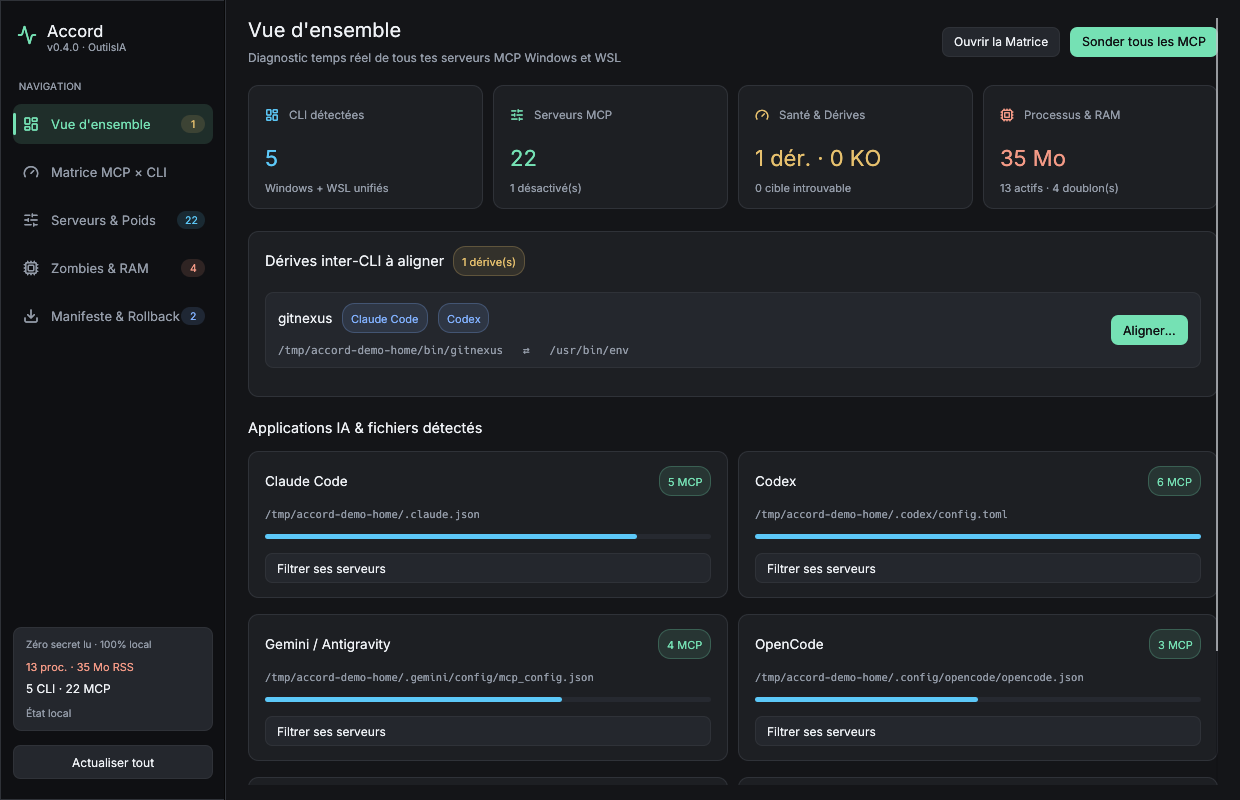
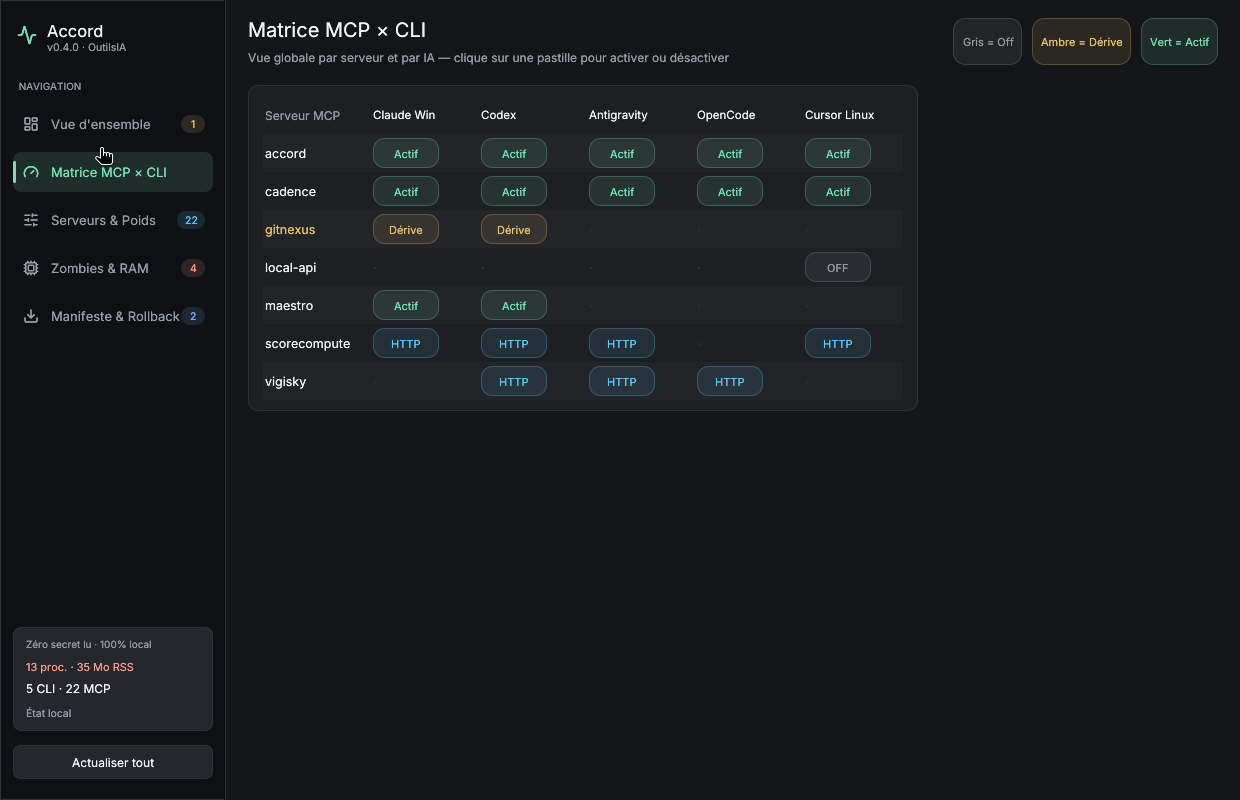
MCP × CLI Matrix
Simultaneously discovers Windows-native and WSL configs (via \\wsl.localhost\...). Click any pill in the matrix to toggle a server ON or OFF non-destructively without deleting its config.
Token Weight & HTTP Probe
Runs bounded initialize + tools/list handshakes to show latency and exact token cost for every individual MCP tool — plus fast TCP UP/DOWN checks for local & remote HTTP MCPs.
Zombies, Drift & Rollback
Finds duplicate Win32 + WSL MCP processes eating RAM, aligns cross-CLI drift (auto-wrapping Linux binaries with wsl.exe for Windows Cursor), and restores any .bak_accord_* backup in 2 clicks.
Supported AI CLIs (Windows + WSL unified)
| Client | Config File | Format & Non-destructive Toggle |
|---|---|---|
| Claude Code (Windows & WSL) | ~/.claude.json | JSON mcpServers · disabled flag |
| Codex (Windows & WSL) | ~/.codex/config.toml | TOML [mcp_servers.*] · enabled = true/false |
| Gemini / Antigravity | ~/.gemini/config/mcp_config.json | JSON mcpServers (stdio + serverUrl) |
| OpenCode | ~/.config/opencode/opencode.json | JSON mcp (local / remote + enabled) |
| Cursor (Windows & Linux) | ~/.cursor/mcp.json | JSON mcpServers · C:\... & wsl.exe wrapper |
| Grok Build | ~/.grok/mcp.json | JSON mcpServers |
Built-in 5-Tool Meta-MCP Server (accord --mcp-stdio)
Let Claude Code, Codex, Cursor, OpenCode, or Antigravity inspect your active MCP servers, cross-CLI drift, token weight, and zombie processes in read-only mode (with a built-in anti-recursion guard so Accord never probes itself).
accord_doctor · accord_list_servers · accord_zombies
Full multi-CLI inventory, cross-CLI drift report, broken-target checks, secret-hygiene key names (never values), and running Win32 + WSL MCP processes.
accord_measure_weight · accord_export_manifest
Measures stdio tool counts, latencies, and context-token estimates plus HTTP UP/DOWN status, or generates a Git-safe, secret-free accord.toml.
# Register Accord itself across all your detected CLIs in one command (creates .bak backups):
accord sync accord /path/to/Accord.exe -- --mcp-stdio --apply

# Useful headless CLI commands (all support --json):
accord doctor
accord weight cadence
accord clean-zombies
accord fix-drift gitnexus
accord export --output accord.toml
Download Accord 0.4.0 & Verify
Windows x64 (Native MSVC)
Standalone egui desktop GUI + CLI + MCP server. Automatically reads both Windows and WSL configs.
Linux x64 (Ubuntu 24.04 · glibc ≥ 2.39)
Native binary with automatic WSLg X11 fallback. Run ./accord ui or any CLI subcommand.
FAQ
Does Accord ever read or export my API keys?
Never. Secret-hygiene warnings and accord.toml exports record environment variable names only (env_keys), never their values.
Is it safe to sync or toggle MCPs?
Yes. Every CLI write command defaults to dry-run. Applying writes creates timestamped .bak_accord_* backups that you can restore in 2 clicks from the Manifest & Rollback tab.
Why does Windows SmartScreen warn on first launch?
Accord.exe is not Authenticode-signed yet. Always verify the downloaded file against SHA256SUMS.txt or the GitHub Release.